AI Pulse Survey Analyzer turns a file of employee feedback into a structured report: themes, sentiment, suggestions, requests, and a short overall summary. This test used one small synthetic CSV so the output can be inspected without exposing employee data. It is a useful check of the workflow, not evidence about a real team or a benchmark of survey accuracy.
What the test set out to check
The goal was simple: take the same sample CSV through the AI Pulse Survey Analyzer on Wiro and inspect whether the result is practical for an HR or people-ops review. The input file contains synthetic free-text survey responses. It was supplied through the model’s inputDocumentUrlMultiple field. The run did not use a local upload, an extra prompt, or a callback URL.
The analyzer accepts several document formats, including CSV, DOCX, PDF, and Markdown. For this test, CSV matters because it is the common export format for pulse tools. The expected output is not a polished executive deck. It is structured analysis that can feed a dashboard, a review meeting, or a follow-up workflow. Treat the labels as a fast reading of the responses, then check representative comments before assigning owners or making policy decisions.
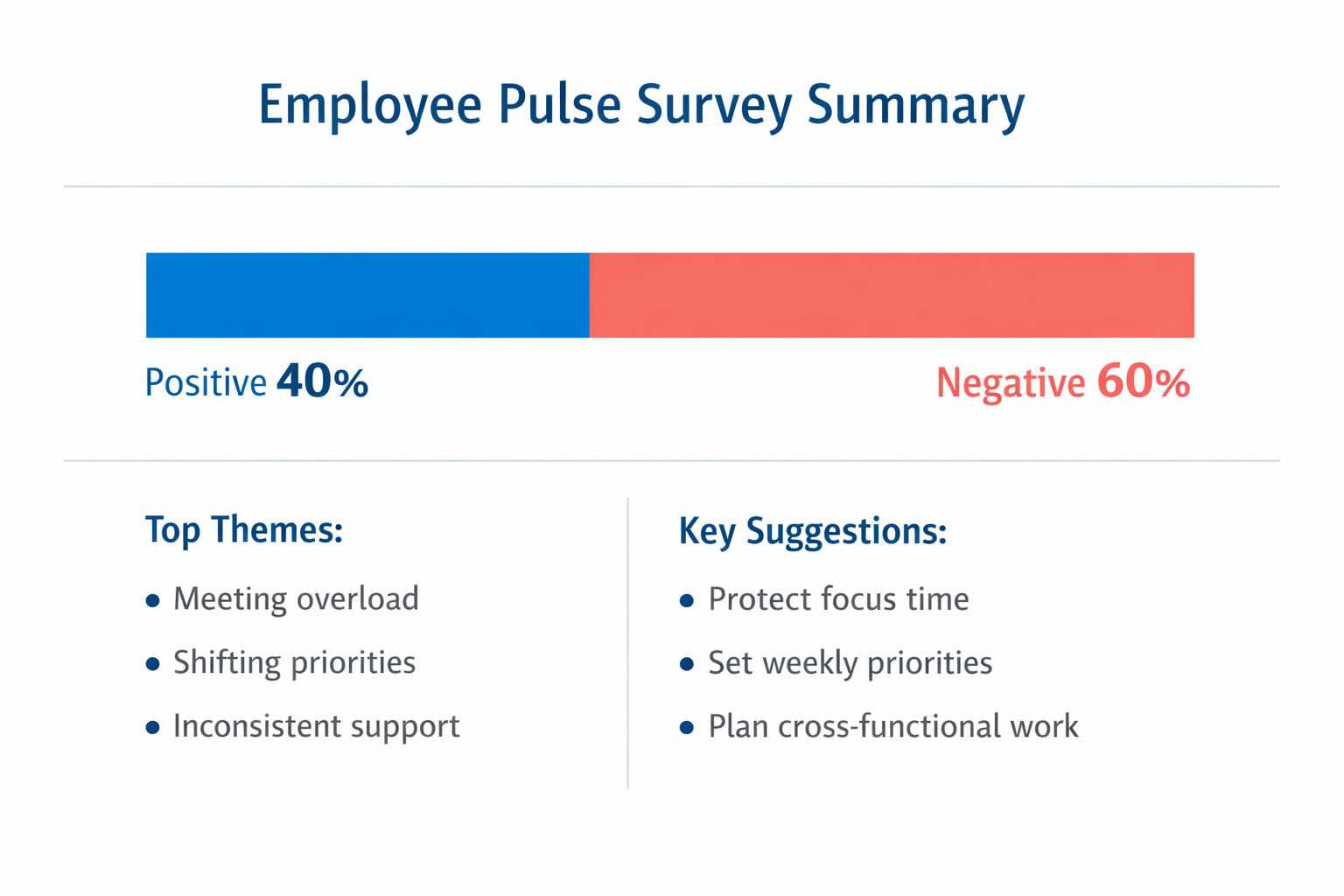
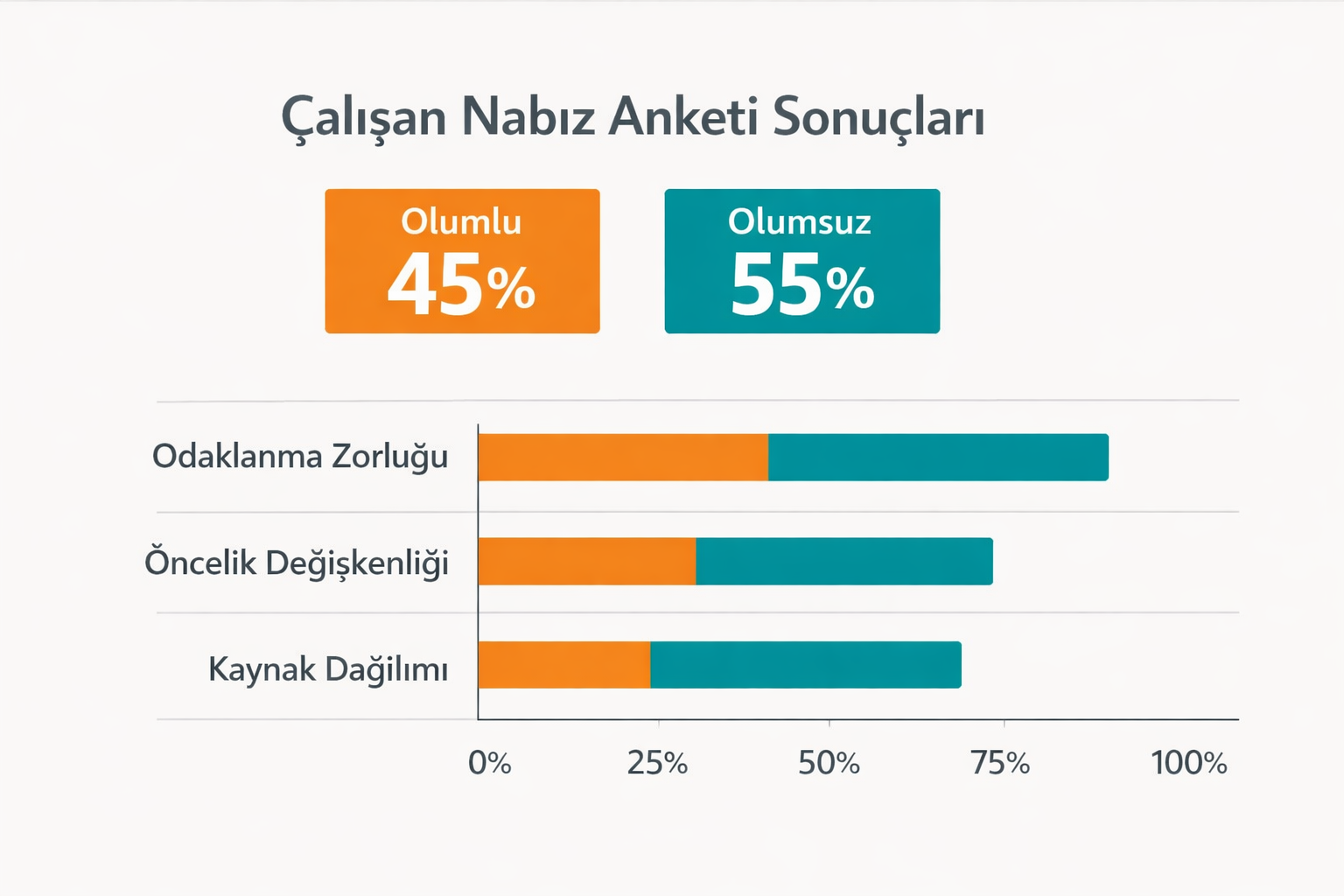
Two language settings were tested against the same file: en and tr. The English run returned three themes, three suggestions, three requests, a summary, and a 40% positive / 60% negative split. The Turkish run returned its own Turkish labels and a 45% positive / 55% negative split. A one-file test cannot explain why those distributions differ, so the figures should not be read as a language-quality score.
English output: what it actually says
The English result points to a work-design problem more than a single isolated complaint. Its themes are meeting overload and distractions, inconsistent prioritization and communication, and workload management with resource allocation. The summary says employees are frustrated by interruptions, shifting priorities, and uneven support across teams.
The practical value is the separation between observations and actions. The suggestions propose focused work blocks, a weekly priority framework, and stronger cross-functional planning. The requests add a standardized escalation process, training resources for new sales hires, and clearer career development for design roles. Those are useful starting points, but they are not automatically validated recommendations. A team should still check frequency, affected groups, and existing owners before acting.
Turkish output: what changes
With language=tr, the report returns Turkish headings and themes: Odaklanma Zorlugu, Oncelik Degiskenligi, and Kaynak Dagilimi. Its overall summary says employees are finding it hard to focus and want more consistency in some processes. The returned sentiment is 45% positive and 55% negative.
This mode is the better fit when the people reviewing the report need Turkish-language labels or when the source responses are primarily Turkish. It should not be used to compare sentiment percentages with the English run from this single test. Instead, choose one reporting language for a recurring survey and keep it constant across periods. That makes trend reviews less likely to mix language behavior with changes in employee feedback.
Parameters, run time, and cost
The tested parameters were inputDocumentUrlMultiple set to the sample CSV URL and language set once to en and once to tr. The file-input field was left empty. The model documentation shows an example task with elapsedseconds of 6.0000 seconds. That is an example response, not a performance promise for every file. The completed runs used here returned analysis files, but their visible output did not expose elapsed time or a per-run charge, so no run-time or cost number is claimed for them. The documentation also does not state a fixed price for this analyzer.
The two inline report visuals were generated separately with GPT Image 1.5 on Wiro. It was given the already-returned values only to make the results easier to scan in the post. Its output should never replace the analyzer JSON as the factual record. For image-generation behavior and parameters, see the checked official OpenAI image generation documentation.
When to pick which model
Pick AI Pulse Survey Analyzer when the job is to convert survey files into a repeatable set of themes, sentiment percentages, suggestions, and requests. It is most useful for a monthly or quarterly review where the same export format and reporting language can be held steady. Remove names, email addresses, and other personal data before upload. Segmenting a real export by team or period can help, but small groups need extra care because trends can expose individuals.
Pick GPT Image 1.5 only when a short report needs a clearly labeled visual companion. It can turn confirmed findings into an image, but it does not calculate the findings in this workflow. Keep the analyzer output, the original export, and the human review as the decision trail. Teams building that trail may also find AI Agent Analytics: 7 Metrics Teams Should Track Before Scaling, AI Agent Audit Trails: 7 Things Teams Need to Log, and Pre-Built vs Custom Agent: How Teams Should Choose useful context.
For a small, anonymized CSV, the analyzer produces a compact starting report. The sensible next step is not blind automation. It is to verify the themes against the response text, assign a human owner to each accepted action, and rerun the same method next period so the trend has meaning.