Easy OCR layout tests asked a narrow question: how much does the layout around text change the result? The same Easy OCR model processed five deliberately different image types: a receipt, a ruled table, a shipping label, a handwritten note, and a full code-editor screenshot. Each input was designed to be readable. That makes the misses useful. They show where layout, character spacing, handwriting, and interface clutter affect extraction before poor photography enters the picture.
The model on Wiro accepts an inputImageUrl and a language selection. Every test below used English. No crop, rotation, contrast adjustment, character allowlist, or custom post-processing was applied after the model response. That matters: this is a baseline for the hosted tool, not a claim about the best result possible with the underlying EasyOCR library. The Wiro documentation names English among the available languages, but it does not expose decoder, confidence threshold, bounding-box merge controls, or image-preprocessing settings in this model form.
What these Easy OCR layout tests check
OCR has two jobs. It must find text regions, then recognize the characters inside them. A clean document can make both jobs look easy. A receipt forces small numbers and punctuation into short columns. A table tests whether rows remain rows. A label mixes capital letters, names, postal formatting, and an identifier. Handwriting tests character shapes rather than typeset glyphs. The editor screenshot asks the model to separate code from menus, panels, filenames, and status text.
Easy OCR on Wiro is the model used for all five tests. The official EasyOCR project page describes the project as a general OCR module for natural-scene and dense-document text and lists support for more than 80 languages. Its API documentation also documents controls such as rotation handling, contrast processing, and bounding-box merging for library users. Those controls are useful context, but they were not parameters available in this Wiro run.
Results from 5 Easy OCR layout tests
1. Receipt: readable words, split monetary values
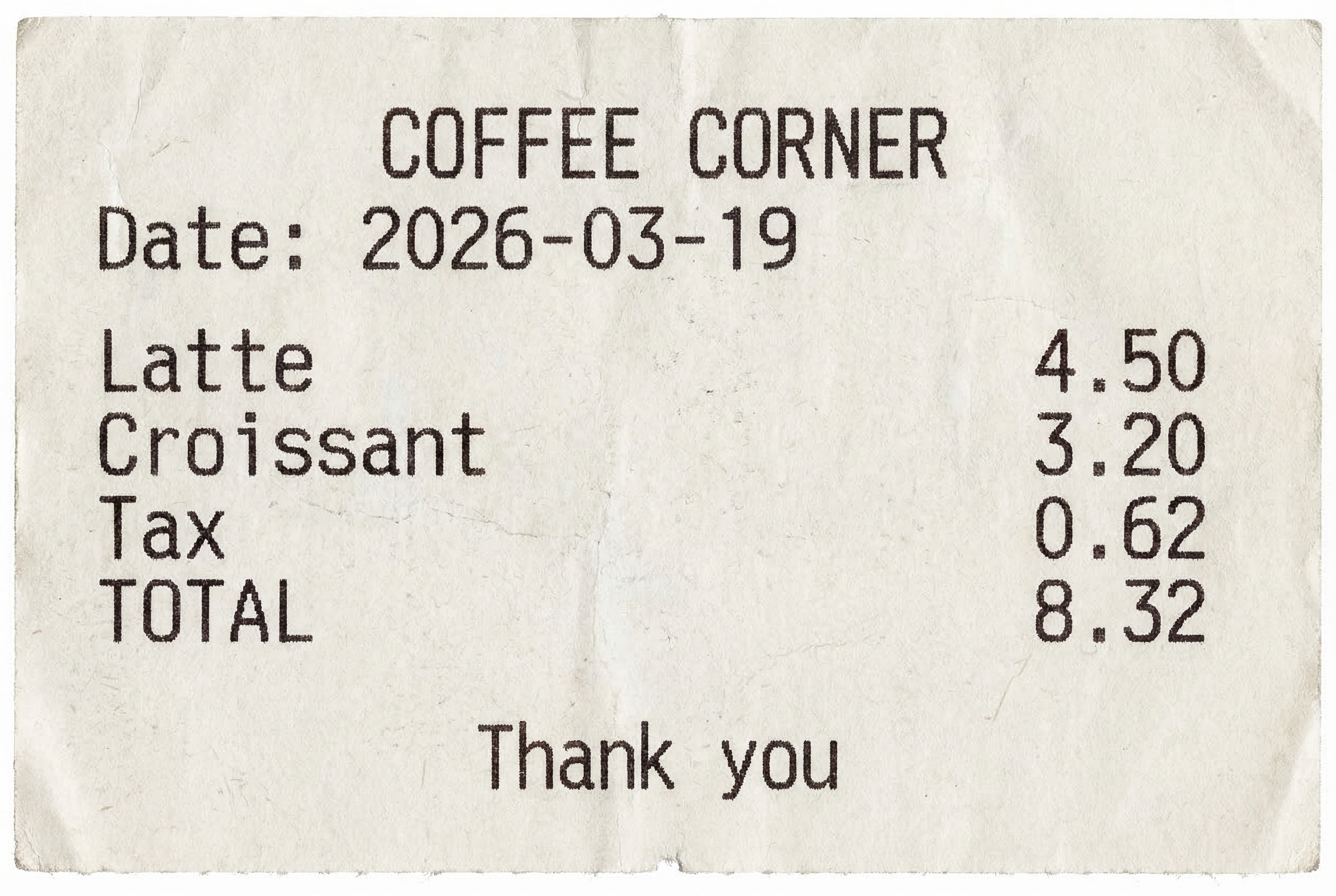
The receipt was deliberately high contrast: black type on a white background, straight-on, with no folds or shadows. Easy OCR recovered the store name, date, item names, total label, and closing phrase. The weakness was numeric grouping. It returned 4 and 50 on separate lines instead of 4.50, with the same split for 3.20, 0.62, and 8.32. This is not a wrong digit problem. It is a structure problem that becomes important when a downstream system expects a price or total as one field.
Pick Easy OCR for a quick readable-text pass on receipts when a human can review the result or when a parser can rejoin predictable number fragments. Do not send this raw output directly into accounting logic. Tight cropping around the receipt and a validation rule for currency patterns should come first.
2. Table: values survive, grid structure does not
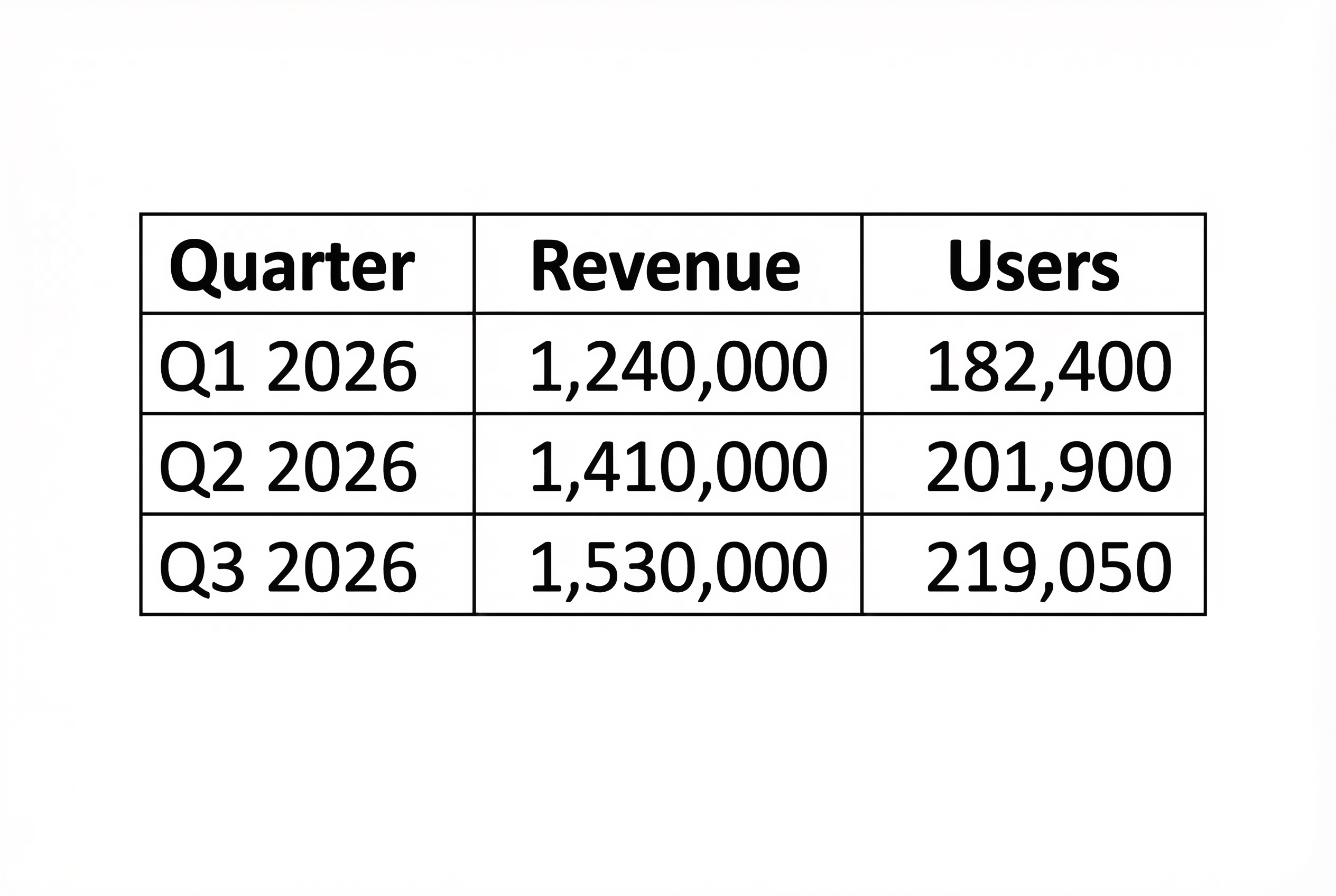
This was the cleanest result. Easy OCR extracted the headers and every quarter, revenue figure, and user count, including commas in values such as 1,240,000 and 182,400. It emitted a linear reading order rather than a table: header labels first, then each row’s values. That is often enough for search, review, or a simple row parser. It is not a reconstructed spreadsheet.
Choose Easy OCR for clean reports or tables when the next step can use reading order and a known schema. If column positions carry meaning, keep the original image, store coordinates when the calling workflow provides them, or use a document parser that returns table cells. Clear rules and consistent spacing helped here; they did not teach the output to preserve a grid.
3. Shipping label: the best fit in this set
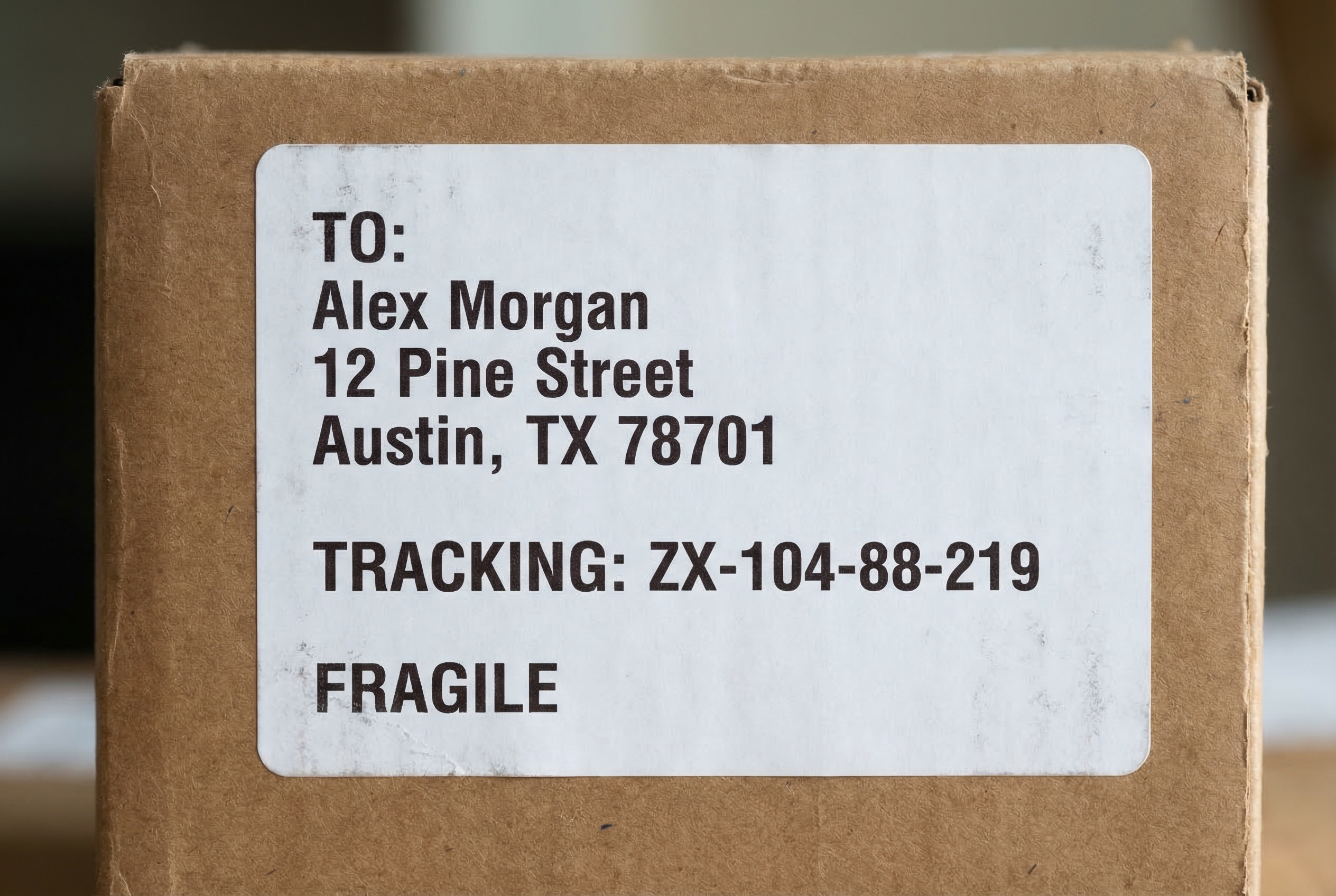
The label output matched the input closely: TO:, Alex Morgan, the street address, Austin, TX 78701, the tracking line, and FRAGILE all survived intact. The hyphens in ZX-104-88-219 also remained. This is the practical sweet spot for the model: printed text, strong contrast, short line lengths, and natural reading order. It handles a mix of all-caps labels and normal capitalization without visible confusion in this test.
Pick Easy OCR for labels, address blocks, package notes, and similar printed artifacts. Still validate identifiers against their expected format. A plausible-looking tracking number can be costly if one character changes, even when the rest of the label is correct.
4. Handwriting: useful signal, not dependable transcription
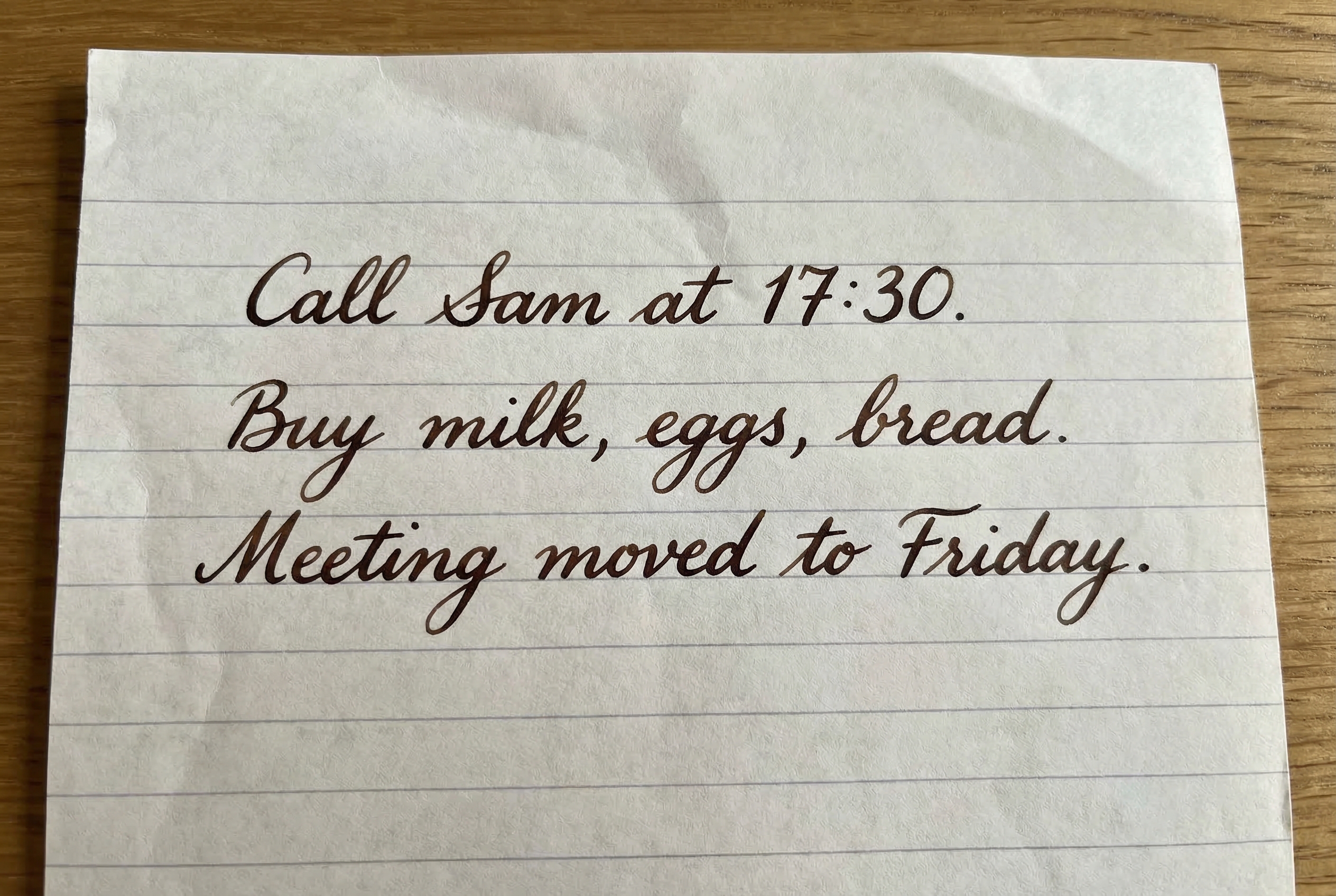
This was the clear failure case. “Call Sam at 17:30” became “Cale_Xam at 1F:30.” “Buy milk, eggs, bread” and “Meeting moved to Friday” broke into inaccurate fragments and out-of-order lines. The model caught pieces of the intended vocabulary, but the output cannot safely serve as a transcription. Neat handwriting and high contrast did not remove the gap between handwritten and typeset recognition.
Use Easy OCR on handwriting only for triage, search hints, or a review queue. For records, signatures, medical notes, or any text that must be exact, use a handwriting-focused workflow and keep a human verification step. This result is a reminder not to judge OCR from printed demos alone.
5. Code editor: code is present, interface noise wins
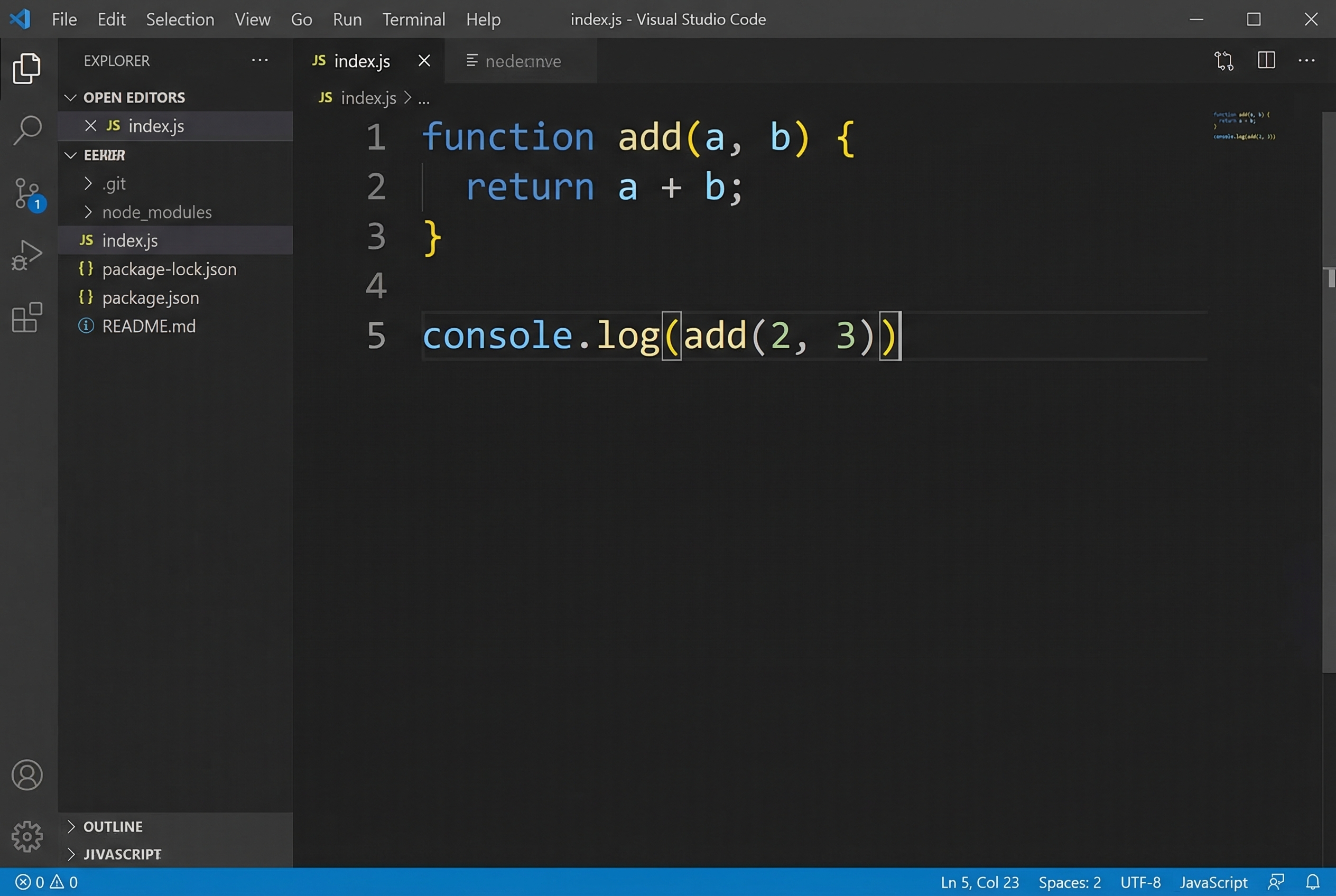
Easy OCR found the JavaScript fragments, including “function”, “add(a,”, “return”, and “a + b;”. It also captured menu labels, explorer items, filenames, status-bar text, and several incorrect strings. The final console call was damaged. The model did what the screenshot asked at a basic level: it read text everywhere. The problem is that a person wants the code region, not the whole interface.
Choose Easy OCR for screenshots only after cropping to the region that matters. For code, crop the editor pane, increase font size before capture, and avoid dark UI chrome where possible. A dedicated code parser or direct access to the source file is better when syntax must stay exact.
Run time and cost on Wiro
The Wiro model documentation includes an example completed task with an elapsed time of 6.0000 seconds. It also shows a separate cancelled-task example with a total cost of $0.003510000000. Those examples are documentation records, not measured prices or timings for the five images in this article, so they should not be treated as a fixed per-image rate. The original task records for these published outputs are not available in the post, and no replacement runs were needed because all five real hosted outputs remain in the article. Image size, queue time, and service configuration can change actual timing and cost.
Practical verdict
Easy OCR is a sensible choice when the target is printed text in a predictable layout: labels performed best, and the clean table retained its values. It needs help with receipts because punctuation and short numeric groups split apart. It is the wrong default for handwriting and a poor first step for uncropped editor screenshots. Start with a sharp, tightly framed image; select English for these examples; preserve the original alongside the extracted text; and validate important numbers and identifiers.
For related tests, see Moondream3 Query vs Easy OCR: 5 Screenshot OCR Tests, dots.ocr-1.5: OCR in 6 Screenshot Tests, and Translate Gemma Image: OCR Translation in 6 Screenshot Tests.
Run Easy OCR on Wiro when the input is a clean label, form, or report and the result can be checked against the source image.