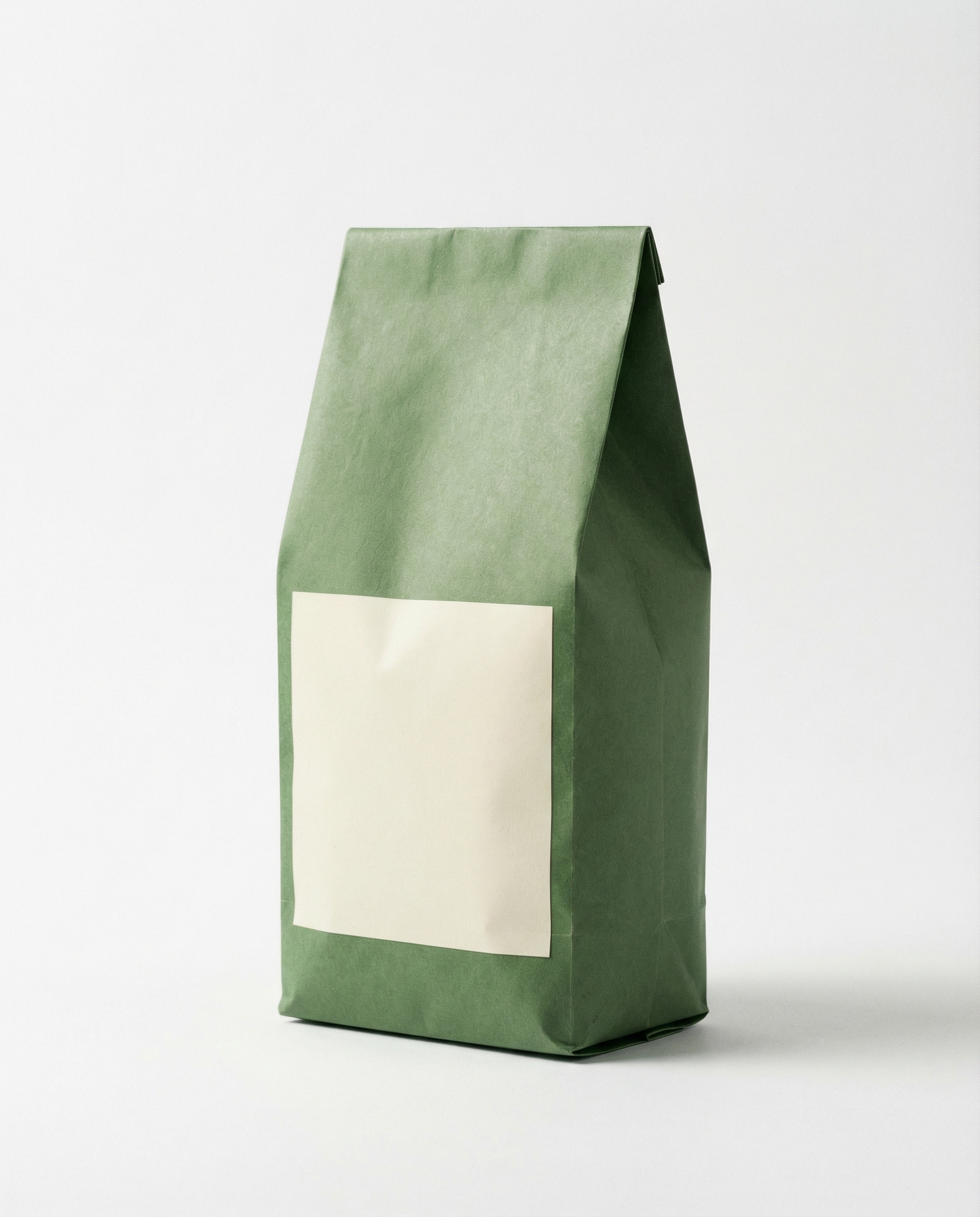
Product Ads with Caption was tested to answer a narrow question: how much can the same product photo change when only the caption preset changes? The source was one coffee bag image. Each run kept the product image and vertical 9:16 ratio fixed, then used a short caption and a different effectType. That makes this a preset test, not a claim that one video model beats another.
What Product Ads with Caption accepts
Product Ads with Caption on Wiro takes one product image, a caption, a ratio, and a named visual preset. The official Product Ads with Caption technical reference lists 42 presets across product, seasonal, Black Friday, and scene-morph styles. It recommends captions of one or two words. That guidance matters here: the moving typography has little time to land, and longer copy would compete with the pack shot.
The test did not alter the product photo between outputs. It used the following parameters:
- inputImage: the coffee bag photo below
- ratio:
9:16 - captions:
SALE,NEW, andLIMITED - effectType: one preset per output
There is no task ID, billing record, or elapsed-time record attached to the three saved videos, so this post cannot honestly assign a Wiro runtime or cost to any individual output. The technical reference shows that completed tasks return elapsed seconds and cost fields, but it does not publish a fixed price or guaranteed duration for this preset set. The run-time and cost cells below are therefore marked as not recorded rather than estimated.
Results at a glance
| Preset | Caption | What the output emphasizes | Run time / cost |
|---|---|---|---|
| Black Pedestal Smoke Neon Text | SALE | High-contrast product reveal with promotional text | Not recorded for this output |
| Product Beach Banner | NEW | Light, lifestyle-led framing with an announcement | Not recorded for this output |
| Space Orbit Product Sale | LIMITED | More theatrical motion and a scarcity-led message | Not recorded for this output |
Preset 1: Black Pedestal Smoke Neon Text
Caption: SALE
effectType: product-with-text-black-pedestal-smoke-neon-text
ratio: 9:16
This output puts the coffee bag in a dark promotional treatment. The preset name is a useful description of what the clip is trying to do: make the product read as a hero object, then make the sale message hard to miss. The short all-caps caption suits that job. It is a direct retail cue, so the visual does not need to explain a product story before the message lands.
Pick this preset for a flash sale, a price-led landing page, or a paid social cut where the offer should lead. It is less suitable for a calm premium brand launch. The dark, high-contrast direction can overpower a delicate product photo, especially if the packaging already relies on subtle colors. Start with a clean cutout or a product photographed against a simple background.
Preset 2: Product Beach Banner
Caption: NEW
effectType: product-with-text-product-beach-banner
ratio: 9:16
The beach-banner output takes a different route. Instead of treating the product like a sale object on a dark stage, it frames the coffee bag with a brighter, more lifestyle-oriented preset and uses NEW as the announcement. The same package remains the evidence that this is the same test item; the shift comes from preset selection, not a new product image.
Choose this style for seasonal launches, food and drink promotions, or catalog creative that needs more atmosphere than urgency. It works best when the product can carry a casual, sunny, or travel-adjacent setting. A luxury item or a business tool may feel mismatched. The caption should stay spare: NEW, SUMMER, or a short product name gives the animation room to work.
Preset 3: Space Orbit Product Sale
Caption: LIMITED
effectType: product-with-text-space-orbit-product-sale
ratio: 9:16
The space-orbit preset is the most stylized of the three. It uses the product as the center of a more dramatic concept and pairs it with LIMITED, a scarcity message that fits a special-drop treatment. The resulting video is not a neutral product demonstration. It is an attention device, which can be exactly right for a limited run or a campaign that needs a stronger visual break in a vertical feed.
Use it for drops, collector editions, gaming-adjacent products, and campaign moments where spectacle is part of the brief. Avoid it when buyers need factual product detail first. A product page explainer, ingredient-focused ad, or restrained brand campaign benefits from a quieter preset. The word LIMITED works because it states the point in one beat. A longer line would dilute the effect.
How to choose among the three
Choose neon pedestal when the message is an offer. Choose beach banner when the message is a new arrival with a lifestyle angle. Choose space orbit when the campaign needs a limited-drop feel. The best preset is not the most animated one. It is the one whose visual tone agrees with the product, the promotion, and the first message viewers need to see.
For production, prepare a high-resolution product image with a clear silhouette. Keep the product centered where possible, avoid tiny package text, and use one or two caption words. Run the selected preset in 9:16 for vertical placements, then review the actual video before buying media. Presets provide a fast creative starting point, but they do not replace checking brand color, legibility, or claim compliance.
Related tests
- Product Ads with Logo: 3 Presets Tested looks at a closely related logo-led format.
- UGC Creator: 4 Product Ad Clips covers a different route to product video creative.
- Product Studio: 3 Effects Tested on One Product Photo shows another way one source image can produce varied marketing assets.
For short promotional video from a single pack shot, Product Ads with Caption is most useful when the creative brief already has a clear message. Pick the preset to match that message, keep the copy short, and judge the final clip on the feed where it will run.