Animate a photo with a reference video, or tell an image-to-video model what should happen? This six-test comparison starts with one still portrait and asks for the same actions: a wave, smile and nod, walk forward, head turn, two-step dance and clap, then a jump and celebration. The aim is not to crown a general video winner. It is to show the practical tradeoff between motion transfer and prompt-driven animation when the person in the source photo needs to remain recognizably the same.
What this photo animation test measures
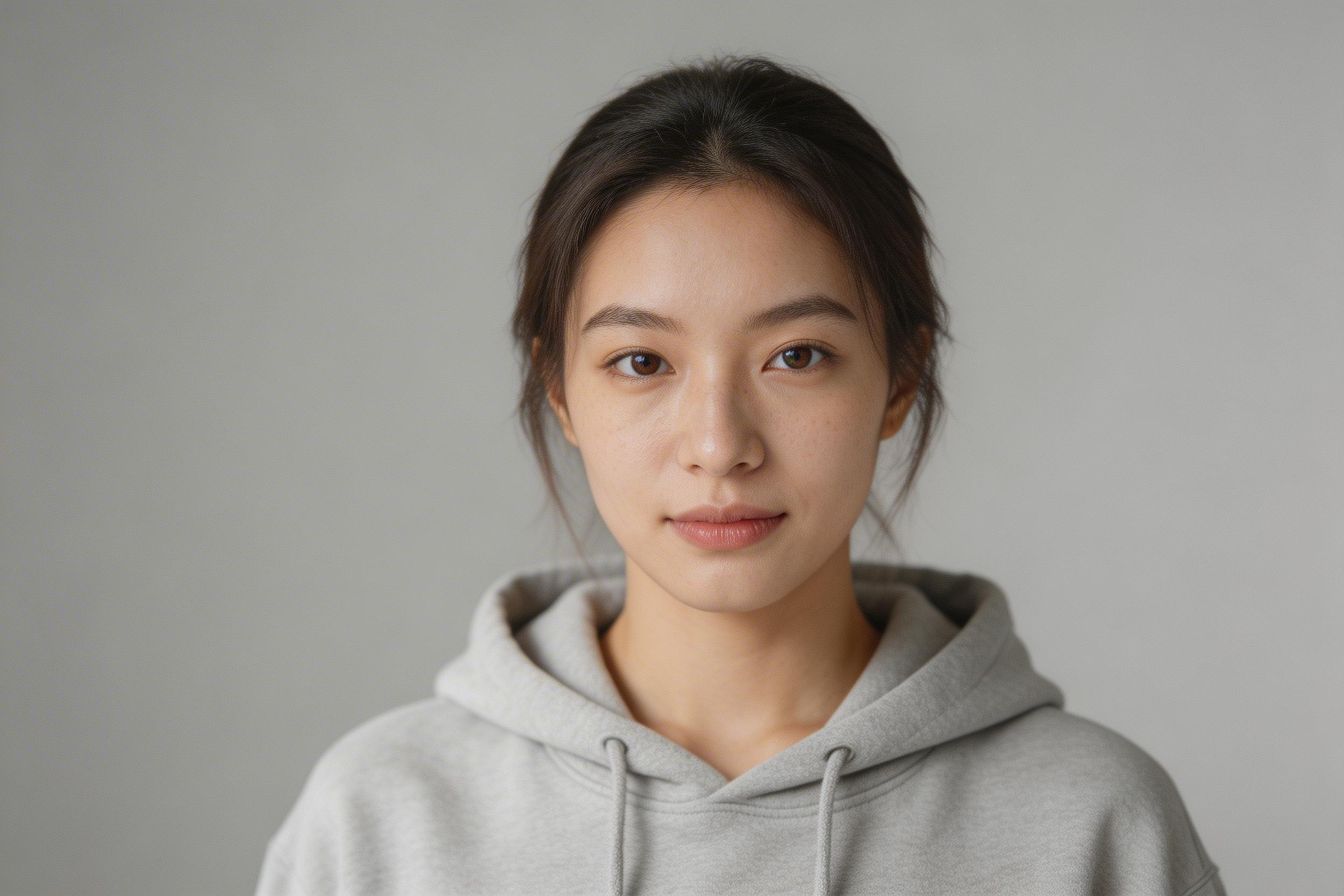
All 18 clips begin from the same reference image. Wan2.2 Animate receives that image plus a driving video. The driving clips were made with P-Video, so the movement exists before the character animation run begins. VACE and Hailuo 2.3 receive the still image and a written instruction for the motion.
That difference matters. Motion transfer gives the model a timing and body-motion template to follow. Prompt-driven image-to-video gives it an action request, then asks it to infer the in-between poses, timing, framing, and contact with the ground. Neither approach is automatically better. They solve different production problems.
- Identity preservation: Does the face, hairstyle, clothing, and overall character stay close to the reference?
- Pose accuracy: Does the clip visibly perform the requested action, in the requested order?
- Temporal stability: Do hands, face, limbs, and background remain coherent as the action unfolds?
Models and inputs
- Wan2.2 Animate: reference image plus driving video for motion transfer.
- VACE: reference image plus text prompt.
- Hailuo 2.3: reference image plus text prompt.
Wan2.2 Animate is built around an explicit motion source. The Wan2.2 repository describes its Animate release as character animation and replacement with holistic movement and expression replication. VACE takes a broader reference-to-video route: its official repository documents text prompts with optional image and video inputs for video generation and editing. Those capabilities help explain why the same still photo creates different control surfaces in this test.
Reference image for animating a photo
Six motion tests from one still
1. Wave
Prompt: faces the camera and waves slowly with the right hand. This is a useful opening check because the hand must rise, separate from the torso, and stay readable without changing the face.
| Wan2.2 Animate | VACE | Hailuo 2.3 |
|---|---|---|
2. Smile and nod
Prompt: looks into the camera, smiles, then nods twice. This isolates facial continuity and small, ordered movements. A plausible smile is not enough if the nods do not arrive afterward.
| Wan2.2 Animate | VACE | Hailuo 2.3 |
|---|---|---|
3. Walk forward
Prompt: walks forward slowly toward the camera for a few steps, then stops. Walking stresses leg geometry, balance, scale change, and how the background responds as the subject approaches.
| Wan2.2 Animate | VACE | Hailuo 2.3 |
|---|---|---|
4. Head turn left and right
Prompt: slowly turns the head to the left, then to the right, then back to center. This is a close look at identity preservation. The face needs to remain the same person through profile angles, not merely return to the starting frame.
| Wan2.2 Animate | VACE | Hailuo 2.3 |
|---|---|---|
5. Two-step dance and clap
Prompt: does a simple two step dance move, side to side, then claps once. The clip combines lateral footwork, arm motion, a beat change, and hand contact. It is the clearest test of whether an action sequence stays temporally stable.
| Wan2.2 Animate | VACE | Hailuo 2.3 |
|---|---|---|
6. Jump and celebrate
Prompt: jumps lightly in place once, then raises both hands in celebration. A jump has a clear takeoff and landing. It tests whether the model can carry a fast whole-body pose through several frames without unstable feet, hands, or facial drift.
| Wan2.2 Animate | VACE | Hailuo 2.3 |
|---|---|---|
Motion transfer versus prompt-driven animation
Wan2.2 Animate makes the motion source part of the brief. That is the better fit when a creator has already approved a performance, needs a specific gesture or rhythm, or wants several characters to inherit the same movement. The quality of the driving video still matters. If the source has unclear limbs, fast occlusion, or an awkward pose, the transfer has less clean motion to preserve.
VACE and Hailuo 2.3 remove that driving-video preparation step. This is useful when the desired movement is simple, exploratory, or still being art-directed. The tradeoff is that text must carry more responsibility. A prompt can name a wave or walk, but it does not provide the exact path, timing, balance, or hand placement that a driving clip does.
For identity-sensitive work, inspect more than the first and last frame. Watch transitions through profile views, raised hands, clap contact, and landing. These are the moments where a still-image animation can reveal face drift, changing clothing detail, or unstable anatomy. For pose-sensitive work, compare the order of actions rather than rewarding a clip simply because it looks lively.
Which workflow to use
| Need | Better starting point | Why |
|---|---|---|
| Match a known performance | Wan2.2 Animate | The driving clip supplies the intended motion path and timing. |
| Quickly explore an action from one photo | VACE or Hailuo 2.3 | A still plus a clear prompt can start the iteration without making a motion reference. |
| Reuse the same movement across subjects | Wan2.2 Animate | One driving performance can anchor repeated motion-transfer runs. |
| Discover variations in mood or gesture | VACE or Hailuo 2.3 | Prompt changes are lightweight when exact choreography is not the goal. |
This is a photo-animation test, not the companion test for camera and scene movement from text prompts. For that separate question, see Wan2.2 Animate vs VACE vs Hailuo 2.3: Six Motion Tests. Related reading: Best Cinematic Image-to-Video Models and LTX-2 Distilled: 8 Motion Prompts for Image-to-Video.
Final take
Choose motion transfer when the movement itself is the asset. Choose prompt-driven image-to-video when speed and creative flexibility matter more than reproducing one exact performance. In both cases, animating a photo works best when evaluation stays concrete: does the person stay recognizable, does the pose happen in the right order, and does the clip hold together from start to finish?
Try Wan2.2 Animate, VACE, or Hailuo 2.3 with the same still and motion brief to decide which workflow fits the shot.