WAN 2.7 video prompt tests put one question ahead of everything else: can a short model run follow camera language and keep a scene coherent while something is actually moving? Five existing Wiro outputs answer that question from different angles. Four start from text; the fifth starts from a supplied still. They are not benchmark scores and they do not prove that every prompt will work. They are a practical look at what happened with the same 5-second, 720P setup.
Model and source notes
Alibaba WAN 2.7 on Wiro accepts text-to-video and image-to-video jobs. Its Wiro controls also accept an optional first image, optional audio, an optional first clip for continuation, 5/10/15-second duration, 720P or 1080P resolution, five text-to-video aspect ratios, prompt extension, watermark, and a seed. The first image or video controls the frame when supplied, so ratio follows that input instead of the text-to-video ratio selector.
For background on the Wan family, see the official Wan site, the Wan open-source repository, and the Wan technical report. Those sources describe earlier open Wan releases, not a specification sheet for this hosted WAN 2.7 endpoint. The observations below are about the five videos embedded here.
Test setup
| Setting | Value used |
|---|---|
| Model | alibaba/wan-2-7 |
| Tests | Four text-to-video; one image-to-video |
| Duration | 5 seconds for every output |
| Resolution | 720P |
| Prompt Extend | False, so the prompts below were used as written |
| Watermark | False |
| Observed Wiro cost | $0.50 per 5-second 720P output |
| Run time | No per-run elapsed time was retained for these five outputs. Wiro documentation shows elapsedseconds in task details, but no timing claim is made here. |
The choice to disable prompt extension matters. It isolates how the video model responded to the wording rather than to a rewritten prompt. Wiro says extension can improve a short prompt but adds processing time. The supplied prompts were already specific: subject, action, camera movement, environment movement, lighting, and a short negative list where it could help.
What the five WAN 2.7 video prompt tests show
Test 1: espresso macro physics

This is the most demanding physics test in the set. The output has to handle liquid mixing, steam, glass, foam, and a narrow depth of field in one shot. Watch the clip for whether the pour reads as a continuous action and whether the milk-and-coffee boundary stays plausible. It is a better use case for a single, controlled macro event than for a recipe sequence with several cuts. The negative prompt is deliberately broad; it may reduce visible defects, but it cannot guarantee real fluid simulation.
Test 2: violinist, hands, and a slow push-in
This test puts a person, hands, a moving bow, background pedestrians, and a camera instruction in the same five seconds. The useful question is not whether every finger is perfect frame by frame. It is whether the shot preserves the idea of a musician playing while the camera moves closer. For social cutaways and mood footage, that read can be enough. For a tight product shot of hands, a real performance, or a clip that must survive close inspection, generate several candidates and choose the cleanest one.
Test 3: robot tracking through wet grass
The robot clip tests layered movement. The subject walks while grass moves independently and the camera tracks alongside. That makes it a practical prompt pattern for creature reveals, toy-scale stories, and visual development. The instruction gives the model one main action and one camera path; that is easier to judge than a prompt with multiple beats. If the delivery needs a character to perform a precise sequence, split the sequence into separate short shots instead of asking one five-second generation to do everything.
Test 4: aerial landscape with fast clouds
This is the cleanest kind of motion brief: a stable wide composition with one visible change. The output shows whether WAN 2.7 can keep a horizon and ridge composition while clouds supply pace. Choose this style when the edit needs an establishing shot, a transition, or a background plate with modest motion. The wording “stable horizon” is worth keeping in aerial prompts because it makes the desired restraint explicit. The clip should be inspected for warping around the ridgeline and for whether the cloud speed matches the requested time-lapse feel.
Test 5: animate a canal still

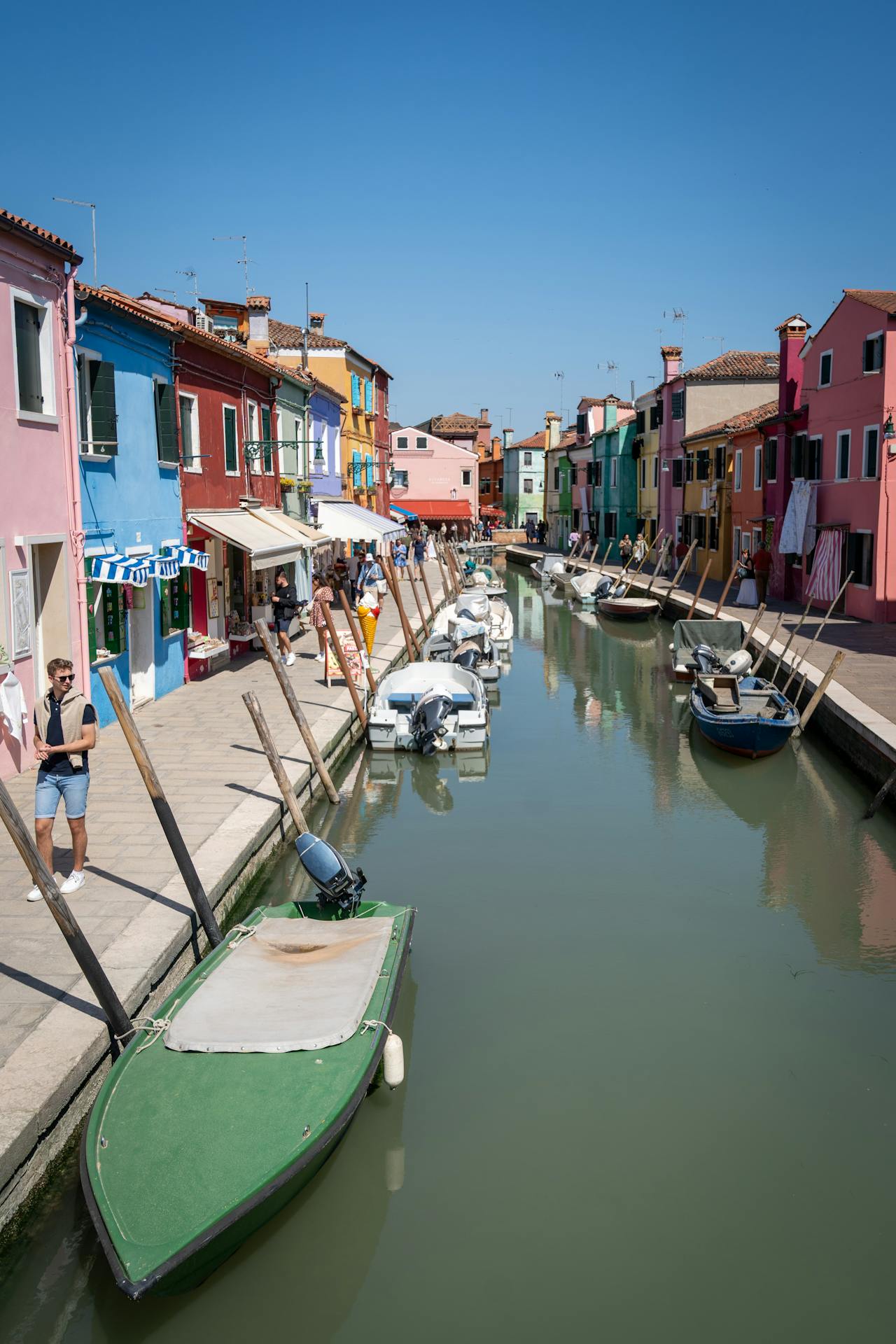
Image-to-video is the right mode when composition matters more than surprise. The supplied canal image fixes the buildings, boats, framing, and aspect ratio; the prompt asks for restrained changes inside that frame. The output can then be judged on water ripples, boat motion, reflections, and the slow push-in. Choose it for animating product art, a keyframe, or an approved visual. Avoid a long list of competing motions. A single image plus two or three local movement instructions gives the model a clearer job.
Controls that affect the result
Use text-to-video when the scene itself can be invented and the aspect ratio is part of the brief. Use image-to-video when an art director has already approved a composition or when a still needs motion without rebuilding the scene. Use a first clip only when continuation matters; Wiro accepts MP4 or MOV clips from 2 to 10 seconds. Add audio only when it is intentional, since the endpoint can generate audio if none is supplied.
Duration and resolution change the production decision. This set proves a 5-second, 720P workflow, not a claim about 10- or 15-second consistency or 1080P quality. Start short, evaluate the motion, then spend more only on a prompt worth extending. A seed can help with reproducibility, while prompt extension is useful for sparse briefs but makes comparison less direct and may take longer.
When to choose WAN 2.7
Choose WAN 2.7 on Wiro for a short cinematic action with clear camera direction, or for giving an existing still a measured movement. It fits the five patterns above: a contained physical event, a performer shot, a tracked miniature subject, a stable landscape, and an animated keyframe. Keep one primary action per clip, name the camera move, and ask for only the background motion that the shot needs.
For more prompt patterns, see cinematic image-to-video model tests, LTX-2 Distilled motion prompts, and five text-to-video API tests. Run the same short brief more than once before treating any single output as a final shot.